Learning

How to Tap into the Booming Custom Keycaps Market: A Guide for Designers

    How to Tap into the Booming Custom Keycaps Market: A Guide for Designers

    The Kapco May 11, 2023

    If you are a designer who loves design, you might have heard of custom keycaps. These are custom-made keycaps that feature unique and creative designs, such as anime characters, Cyberpunk, Japanese Theme, spacebars, and more. Custom keycaps are not only aesthetically pleasing, but also functional and durable, as they are made of high-quality materials such as PBT, PC-PBT, ABS, resin, SLA, and etc. Cyberpunk Samurai Keycaps  Custom keycaps are becoming more and more popular among keyboard enthusiasts and gamers, who are looking for ways to personalize and enhance their keyboards. According to a recent market intelligence report by Marketwatch, the global artisan keycaps market is expected to grow at a significant rate during the forecast period 2023-2031. The report attributes this growth to various factors, such as: The increasing demand for online gaming, e-sports, streaming, and personalization, which drives the need for customized and high-performance keyboards. The rising awareness and appreciation of keyboard art and culture, which fosters the interest and passion for custom keycaps among keyboard lovers. The availability and accessibility of online platforms and communities, such as Shopify stores and Etsy, where custom keycap makers and buyers can connect and exchange ideas and products. Full article click here As a designer, you might be wondering how you can tap into this booming market and showcase your talent and creativity. Well, you are in luck, because we have some tips and insights for you on how to get started and succeed in the custom keycaps market. How to get started as a custom keycap designer? The first step to becoming a custom keycap designer is to have a clear idea of what kind of keycaps you want to create and who your target audience is. You can do some research on the existing market trends and customer preferences by browsing through online platforms and forums, such as Reddit , where you can find inspiration and feedback from other custom keycap makers and buyers. You also need to decide on what materials and techniques you want to use to make your keycaps. There are various options available, such as: PBT keycaps: This stands for polybutylene terephthalate, which is a high-quality plastic that is more expensive and harder to produce than ABS. PBT keycaps are usually rougher and matte, but they are more resistant to fading and shine than ABS keycaps. PC-PBT keycaps: This stands for polycarbonate-polybutylene terephthalate, which is a hybrid plastic that combines the best qualities of PC and PBT. PC-PBT keycaps are transparent and durable, and they can have different colors and effects. PC-PBT keycaps are also more affordable than resin or SLA keycaps. Resin keycaps: This is a liquid substance that hardens into a solid form when mixed with a catalyst. Resin keycaps are handcrafted and polished by artisans, and they can have various colors, patterns, textures, and effects. Resin keycaps are unique and beautiful, but they are also very costly compared to other types of keycaps. SLA keycaps: This stands for stereolithography, which is a type of 3D printing that uses a laser to cure liquid resin into solid layers. SLA keycaps are precise and detailed, and they can have complex shapes and designs. SLA keycaps are also expensive compared to other types of keycaps. ABS keycaps: This stands for acrylonitrile butadiene styrene, which is a common plastic that is cheap and easy to produce. ABS keycaps are usually smooth and glossy, but they tend to fade and shine over time due to oils from fingers. ABS vs PBT You also need to choose the shape, size, profile, and theme of your keycaps. You can either follow the standard dimensions and layouts of common keyboards or create your own custom ones.  You can also choose from various themes and designs for your keycaps, such as: Anime keycaps: These are inspired by Japanese animation or manga characters or scenes. Anime fans can find custom keycaps featuring their favorite characters from Naruto, One Piece, Attack on titan, Demon Slayer, etc. Japanese theme Keycaps: These are inspired by the culture and aesthetics of Japan. Japanese fans can find custom keycaps featuring elements such as cherry blossoms, samurai, geisha, sushi, kanji, etc. Cyberpunk keycaps: These are inspired by the genre of science fiction that depicts a dystopian future where technology and society are in conflict. Cyberpunk fans can find custom keycaps featuring elements such as neon lights, hackers, cyborgs, graffiti, etc. Spacebar: These are customized for the longest and most visible key on your keyboard. Spacebar fans can find artisan keycaps featuring various images or words that fit the spacebar size and shape, such as landscapes, animals, logos, quotes, etc. Artisan keycaps: These are handcrafted by skilled artists who use various materials and techniques to create unique and intricate keycaps. Artisan fans can find artisan keycaps featuring various themes and styles, such as animals, plants, food, skulls, robots, etc. These are just some examples of custom keycaps that you can create or find online or offline. You can also use your own imagination and creativity to come up with your own original and distinctive keycaps. How to succeed as a custom keycap designer? The second step to becoming a custom keycap designer is to have a clear strategy and plan on how to market and sell your keycaps. You need to consider various aspects such as: Pricing: You need to set a reasonable and competitive price for your keycaps that reflects the quality and value of your products. You also need to factor in the cost of materials, labor, shipping, taxes, etc., and make sure that you have a profit margin that allows you to sustain and grow your business. Branding: You need to create a strong and recognizable brand identity for your keycaps that sets you apart from other competitors. You need to have a catchy and memorable name, logo, slogan, etc., that represents your style and vision. You also need to have a consistent and appealing visual identity across all your platforms and channels. Marketing: You need to promote and advertise your keycaps to reach your target audience and potential customers. You need to use various online and offline methods such as social media, websites, blogs, forums, newsletters, podcasts, videos, events, etc., to showcase your products and services. You also need to engage and interact with your customers and followers by providing useful information, feedback, support, etc. Distribution: You need to have a reliable and efficient distribution system that allows you to deliver your keycaps to your customers in a timely and safe manner. You need to choose the best shipping options and carriers that suit your needs and budget. You also need to have a clear and fair return and refund policy that protects both you and your customers. Marketing Strategy  How to partner with The KapCo as a custom keycap designer? The third step to becoming a custom keycap designer is to partner with The KapCo, a company that specializes in creating high-quality custom keycaps for all kinds of keyboards. The KapCo is one of the key players in the custom keycaps market, and it offers a new business model that cooperates with designers to design keycaps. The KapCo is a company that was founded by keyboard enthusiasts who wanted to share their passion and expertise with other keyboard lovers. The KapCo offers a wide range of custom keycaps that cater to different tastes and needs, such as PBT, PC-PBT, ABS, resin, etc. The KapCo also offers premium shipping, easy and secure payment, friendly and helpful customer service, and money-back guarantee. The KapCo has received many positive reviews and testimonials from its customers who have praised its products and services. The KapCo is not only a company that sells custom keycaps but also a company that cares about its designers and their creativity. The KapCo offers a unique opportunity for custom keycap designers to partner with them and design keycaps for their customers. The KapCo provides the following benefits for its designers: Exposure: The KapCo showcases the designers' work on its website and social media platforms, where they can reach a large and loyal audience of keyboard enthusiasts and gamers. The KapCo also credits the designers for their work and links to their personal platforms and channels. Support: The KapCo provides technical and logistical support for the designers, such as providing materials (3D motion video to promote keycaps), tools, equipment, etc., to create their keycaps. The KapCo also handles the shipping, delivery, customer service, etc. Compensation: The KapCo pays the designers a competitive commission for each keycap they design and sell. The KapCo also offers bonuses and incentives for the designers who achieve certain milestones or goals.   If you are a custom keycap designer who wants to partner with The KapCo and design keycaps for their customers, you can visit their website or contact them via email or pm on Instagram to learn more about their partnership program. You will not regret it! Conclusion Custom keycaps are a great way to customize your keyboard and express your personality and style. They are also a great way to showcase your talent and creativity as a designer. The custom keycaps market is a booming and lucrative market that offers huge opportunities and potential for designers who want to tap into it. The KapCo is a company that specializes in creating high-quality custom keycaps for all kinds of keyboards. The KapCo also offers a new business model that cooperates with designers to design keycaps for their customers. The KapCo provides exposure, support, and compensation for its designers who partner with them. If you are interested in buying or creating your own custom keycaps for your keyboard, you should visit The KapCo's website or social media platforms to learn more about their products and services.  Thank you for reading this article and we hope you enjoyed it. Please contact us or place an order for your custom keycaps today!

    Keyboard Layouts by Country: Everything You Need to Know About Typing in Different Languages and Regions

      Keyboard Layouts by Country: Everything You Need to Know About Typing in Different Languages and Regions

      The Kapco May 8, 2023

      If you have ever traveled to a different country and tried to use a keyboard there, you may have noticed that the keys are not arranged in the same way as your own keyboard. Or you may have wondered why keyboards in different countries look different in the first place. In this article, we will explain some of the reasons behind the diversity of keyboard layouts by country, and how they affect the way people type and communicate. We will also give you some tips on how to switch between keyboard layouts on your computer and how to find the best keyboard layout for your needs. What Does Keyboard Layout Mean? A keyboard layout is the way the keys on a keyboard are organized according to the language and region of the user. A keyboard layout determines what symbols are printed on the keys, what keys are used to type certain characters, and what keys have special functions. A keyboard layout can also influence the typing speed, accuracy, comfort, and ergonomics of the user. There are many different keyboard layouts in use around the world, but some of the most common ones are: QWERTY: The most popular layout for English-speaking countries, such as the US, UK, Canada, Australia, etc. It is named after the first six letters on the top row of the keyboard. QWERTY layout AZERTY: The standard layout for French-speaking countries, such as France, Belgium, Switzerland, etc. It is named after the first six letters on the top row of the keyboard. AZERTY layout QWERTZ: The standard layout for German-speaking countries, such as Germany, Austria, Switzerland, etc. It is named after the first six letters on the top row of the keyboard. QWERTZ layout Dvorak: An alternative layout for English-speaking countries, designed to reduce finger movement and increase typing speed. It is named after its inventor, August Dvorak. Dvorak layout Colemak: Another alternative layout for English-speaking countries, similar to Dvorak but with less changes from QWERTY. It is named after its creator, Shai Coleman. Colemak layout Nordic: A variation of QWERTY for Nordic countries, such as Denmark, Finland, Norway, Sweden, etc. It has some extra letters and symbols for the Nordic languages, such as Å, Ä, Ö, etc. Nordic layout Workman: Another alternative layout for English-speaking countries, similar to Dvorak and Colemak but with more focus on the middle and bottom rows. It is named after its creator, OJ Bucao. Workman layout Swedish: A variation of QWERTY for Sweden and Finland. It has some extra letters and symbols for the Swedish and Finnish languages, such as Å, Ä, Ö, etc. Swedish layout Turkish: A variation of QWERTY for Turkey and some other Turkic-speaking countries. It has some extra letters and symbols for the Turkish and Turkic languages, such as Ç, Ğ, İ, Ö, Ş, Ü, etc. Turkish layout Why Do Keyboards Look Different in Different Countries? The main reason why keyboards look different in different countries is because of the different languages and alphabets they use. For example French has more accented letters than English so it needs more keys to type them. German has some unique characters like ß and ü that are not found in English so it needs different keys to type them. Some languages use non-Latin scripts such as Chinese, Japanese, Arabic and etc. so they need different input methods to type them. Another reason why keyboards look different in different countries is because of historical and cultural factors. For example: QWERTY was originally designed for typewriters in the 19th century to prevent jamming of the keys. However, it was not optimized for efficiency or ergonomics. Some countries adopted QWERTY because of its popularity and compatibility with other devices. Some countries modified QWERTY to suit their languages and preferences. Some countries developed their own keyboard layouts based on their own standards and traditions. What are the Pros and Cons of Different Keyboard Layouts? Different keyboard layouts have their own advantages and disadvantages depending on various factors such as: Typing speed: Some keyboard layouts are designed to improve typing speed by placing the most frequently used letters in the home row or reducing finger movement. For example, Dvorak claims to be 20% faster than QWERTY on average. However, typing speed also depends on other factors such as personal preference, familiarity, practice, etc. Typing accuracy: Some keyboard layouts are designed to reduce typing errors by minimizing adjacent key presses or avoiding common typos. For example, Colemak claims to reduce typos by 50% compared to QWERTY. However, typing accuracy also depends on other factors such as skill level, attention span, distractions, etc. Typing comfort: Some keyboard layouts are designed to enhance typing comfort by reducing finger fatigue or strain. For example, Dvorak claims to reduce finger travel by 60% compared to QWERTY. However, typing comfort also depends on other factors such as keyboard quality, posture, environment, etc. Typing ergonomics: Some keyboard layouts are designed to prevent typing injuries such as carpal tunnel syndrome or repetitive strain injury by improving hand posture or alignment. For example, Dvorak claims to reduce wrist movement by 70% compared to QWERTY. However, typing ergonomics also depends on other factors such as keyboard size, shape, angle, etc. Typing compatibility: Some keyboard layouts are more compatible with different devices, software, or languages than others. For example, QWERTY is the most widely supported layout for most computers, smartphones, tablets, etc. However, some keyboard layouts may require special drivers, settings, or adapters to work properly. Some keyboard layouts may also have difficulties with certain applications or websites that do not support them. How to Switch Between Keyboard Layouts on Your Computer? If you want to try different keyboard layouts on your computer you can easily switch between them by following these steps: For Windows 10 users: go to Settings > Time & Language > Language > Preferred languages > Add a language. Choose the language and keyboard layout you want to add and click Next. Check the box for Install language pack and set as my Windows display language if you want to change your entire system language or uncheck it if you only want to change your keyboard layout. Click Install and wait for the process to finish. For Mac users: go to System Preferences > Keyboard > Input Sources > +. Choose the language and keyboard layout you want to add and click Add. You can also check the box for Show Input menu in menu bar if you want to access your keyboard layouts from the top right corner of your screen. For Linux users: go to Settings > Region & Language > Input Sources > +. Choose the language and keyboard layout you want to add and click Add. Once you have added your desired keyboard layouts, you can switch between them by using these shortcuts: For Windows 10 users: press Windows key + Space Bar to cycle through your keyboard layouts, or click on the language icon on the bottom right corner of your screen and select your keyboard layout from the list. For Mac users: press Option + Command + Space Bar to cycle through your keyboard layouts, or click on the input menu icon on the top right corner of your screen and select your keyboard layout from the list. For Linux users: press Super + Space Bar to cycle through your keyboard layouts or click on the input menu icon on the top right corner of your screen and select your keyboard layout from the list. How to Find the Best Keyboard Layout for Your Needs? Finding the best keyboard layout for your needs depends on various factors such as: Your language: If you type in a language that uses a different alphabet or script than English, you may need a keyboard layout that supports it. For example, if you type in Arabic, you may need a keyboard layout that has Arabic letters and symbols on it. Your preference: If you type in English or a language that uses Latin script, you may have more options for keyboard layouts. You may prefer a keyboard layout that matches your region or culture such as QWERTY for US users or AZERTY for French users. You may also prefer a keyboard layout that optimizes your typing speed, accuracy, comfort, or ergonomics such as Dvorak or Colemak. Your device: If you use different devices for typing such as a laptop, a desktop, a tablet, or a smartphone, you may need a keyboard layout that is compatible with them. If you use a laptop with a built-in keyboard, you may need a keyboard layout that matches its size and shape. Your budget: If you want to buy a new keyboard with a different keyboard layout, you may need to consider your budget. Some keyboard layouts may be more expensive or harder to find than others. For example, if you want to buy a Dvorak keyboard, you may need to order it online or customize it yourself. To help you find the best keyboard layout for your needs, you can use some online tools or resources such as: Keyboard Tester: A website that lets you test different keyboard layouts on your browser without installing anything. You can see how each key is mapped and how it feels to type on different layouts. You can also compare different layouts side by side and see their statistics and ratings. Typing Test: A website that lets you measure your typing speed and accuracy on different keyboard layouts. You can choose from various texts and languages and see how fast and accurate you can type on different layouts. You can also see your progress and improvement over time. Typing Club: A website that lets you learn and practice different keyboard layouts with interactive lessons and games. You can choose from various layouts and languages and see how to type each key and character. You can also track your performance and achievements. Conclusion Keyboard layouts by country are an interesting and important aspect of typing and communication. Different countries have different keyboard layouts because of their different languages, alphabets, histories, and cultures. Different keyboard layouts have their own advantages and disadvantages depending on various factors such as typing speed, accuracy, comfort, ergonomics, and compatibility. Different keyboard layouts also have their own main differences that affect how they look and feel. You can switch between different keyboard layouts on your computer by following some simple steps. You can also find the best keyboard layout for your needs by considering some factors such as your language, preference, device, and budget. We hope this article has given you some useful information and insights about keyboard layouts by country. If you want to learn more about keyboards, keycaps, switches or anything related to typing check out our website The KapCo for more articles, guides, reviews and tips. The KapCo is your one-stop shop for all your typing needs. Whether you are a beginner or a pro we have what you need. Thank you for reading and happy typing!

      Wrist Rests: Do I need it?

      Wrist Rests: Do I need it?

      Thomas Team Apr 14, 2023

      Are you experiencing wrist pain while working from home? You're not alone! Many people are also struggling with this issue. But the solution might be simpler than you think - it could be all about how you position and support your wrists in your workspace. Why You Might Need a Wrist Rest Typing on a computer keyboard often leads to awkward wrist positions, where people tend to raise their shoulders, tense their arms, and put pressure on their wrists. This can cause various issues such as tennis elbow, tenosynovitis, and carpal tunnel syndrome. Wrist rests can help by providing a comfortable resting surface for your wrists, reducing pressure on your wrists, and preventing you from raising your shoulders. Potential Problems with Wrist Rests However, using a wrist rest incorrectly can lead to further issues. Heavy and frequent contact on a wrist rest can still irritate wrist structures and cause injuries. Inappropriate sizes and heights of the wrist support relative to the keyboard can also cause awkward hand positions and lead to carpal tunnel syndrome, tendon injuries, and tenosynovitis. Should You Get a Wrist Rest? Whether you're working in an office or from home, a wrist rest can be beneficial if chosen wisely. Before buying a wrist rest, make sure to consider your overall desk arrangement. Your desk should allow you to distribute your weight evenly to prevent heavy wrist contact on the surface. Your arms should rest at a 90-110 degree angle, preventing you from raising your shoulders. When choosing a wrist rest, opt for one that is soft and without sharp edges. Make sure it matches your keyboard's width, height, and slope to allow your wrist to be in a neutral (straight) position. For flatter designed keyboards, you may not need a wrist rest, but keyboards with increased height and slope will require thicker support. Additionally, make sure the contact on your wrist rest is with the heels of your palms rather than your wrists. Don't forget that a separate wrist rest for your mouse can also be used. It's important to remember that even the smallest injuries can lead to bigger issues down the line. So, take care of your health by doing a risk assessment of your workspace and investing in a good ergonomic workstation. Happy typing!

      The Ultimate Guide to Keyboard Sizes and Layouts: Everything You Need to Know

      The Ultimate Guide to Keyboard Sizes and Layouts: Everything You Need to Know

      The Kapco Mar 21, 2023

      Understand the difference of mechanical keyboard sizes in this comprehensive guide. A quick review on which keyboard layout is the most suitable for you.

      ANSI & ISO layouts: What's the difference?

      ANSI & ISO layouts: What's the difference?

      The Kapco Mar 16, 2023

      Especially if you're a new-come to the mechanical keyboard world, taking the time to understand the differences between ANSI and ISO will save you from headaches and compatibility issues down the road.

      Dye-Sublimation vs. Doubleshot Keycaps: How They're Printed

      Dye-Sublimation vs. Doubleshot Keycaps: How They're Printed

      The Kapco Mar 9, 2023

      Learn the difference between Dye-Sublimation and Double-Shot keycaps printing methods on manufacturing, durability, design, legends, RGB compatibility, and cost!

      ABS vs PBT: Which Makes Better Keycaps?

      ABS vs PBT: Which Makes Better Keycaps?

      The Kapco Mar 9, 2023

      PBT vs ABS keycaps: Let's compare and see if the myth about PBT being superior is true!

      Learn your keycaps: A guide to keycap profile and material

      Learn your keycaps: A guide to keycap profile and material

      The Kapco Feb 24, 2023

      Master the art of keycap selection with our ultimate guide! From the different materials to profiles, colors, and designs, we cover everything you need to know. Whether you're a beginner or an experienced enthusiast, our comprehensive guide is your one-stop-shop for all things keycaps

      PC Keycaps: What makes these transparent keycap so special?

      PC Keycaps: What makes these transparent keycap so special?

      Thomas Team Feb 21, 2023

      PC Keycaps: What makes these transparent keycap so special? PC keycaps (Polycarbonate plastic keycaps) are among the keycap styles that are rising in trend. Keycap enthusiasts have praised its semi-transparent transparent characteristics that act like see-through pudding wall, compared to only 50% for pudding keycaps. However, these kinds of keycaps are less commonly seen in the market due to some pros and cons. We have conducted extensive research and are ready to share our findings with you now! PCPBT Keycap (left) vs PBT Keycap (right) PC keycaps, made from polycarbonate plastic, are becoming increasingly popular. They are known for their semi-transparent appearance and high resistance to heat and chemicals. Premium quality PC keycaps can even be made to be 99% transparent, as seen in keyboards such as the LOFREE 1% Transparent Mechanical Keyboard. Let's take a closer look at this niche keycap style.   What is PC Keycap? PCPBT keycap on different RGB lights In a nutshell, polycarbonate plastic is a type of thermoplastic polymer known for its high impact resistance, transparency, and UV light resistance. PC keycaps can be dyed in any color or molded into keycaps straight from their raw state, resulting in crystal-clear keycaps. This allow tons of new design possibilities, especially for RGB keyboard users. If you're looking to replace your keycaps for your RGB keyboard, PC keycaps are something you don't want to miss out on!   PC Keycap highlight PC Keycaps can come in two forms: colored semi-transparent or fully transparent. Because PC Keycaps are resistant to UV light and prone to yellowing, they can stay fresh and new for years to decades. The legend on PC Keycaps is usually printed using screen printing or pad printing. The former is an older process and is prone to wear and tear, while the latter is a modern process and can be UV screened to prevent yellowing. PCPBT Keycaps closeup Additionally, PC Keycaps can be doubleshot with other materials such as PBT to create PCPBT Keycaps. This allows for greater design possibilities, and the high heat resistance of PBT allows for designs to be printed on the keycaps via dye-sublimation. With these features, more and more people are starting to explore PC Keycap designs. Material Polycarbonate plastic Appearance Semi-transparent or fully transparent UV Resistance High resistance to UV light Legend Printing Screen or pad printing; can be UV screened to prevent yellowing Double-Shot Can be combined with PBT to create PCPBT Keycaps; designs can be printed via dye-sublimation Durability Tough and less likely to crack or break Scratch Resistance Highly resistant to scratches and abrasions; lettering on keycaps won't wear off easily Texture Smooth and silky to the touch Thickness and Weight Generally thicker and heavier than traditional keycaps; provides a more satisfying typing experience Cost Generally more expensive than traditional keycaps made from ABS or PBT plastic; varies based on several factors     Durability Polycarbonate is known for its toughness and can withstand the rigors of daily use better than other materials. This means that PC Keycaps are less likely to crack or break.   Scratch and Abrasion Resistance Polycarbonate is also highly resistant to scratches and abrasions. This means that the lettering on the keycaps won't wear off easily, even with prolonged use.   Premium Feel PBT keycap vs PCPBT keycap PC Keycaps have a unique texture that feels smooth and silky to the touch. This can make typing a more enjoyable experience, particularly for those who spend long hours at the keyboard.   Thickness PC Keycaps are generally thicker and heavier than traditional keycaps because of the denser and stronger nature of Polycarbonate plastic. This can provide a more satisfying typing experience and help produces the "thockier-sided" sounds.   Cost PC wall of PCPBT keycaps As a general rule, PC Keycaps are more expensive than traditional keycaps made from ABS or PBT plastic. However, the price can vary depending on several factors, including the quality of the raw materials, the thickness of the keycaps, the brand, and the design. While cheap PC keycaps do exist, they may not be of the same quality as high-end sets, which can cost several hundred dollars. Nonetheless, it is definitely worthwhile to check them out!   Key-take away PC Keycap is strong & durable, usually comes with thicker wall. PC Keycap works greatly on RGB keyboard. Cheaper PC Keycaps cost from 30$, while premium PC keycap can cost up to 100$

      Upgrade Your Gaming Setup: Must-Have Accessories for Gamers

      Upgrade Your Gaming Setup: Must-Have Accessories for Gamers

      Thomas Team Feb 16, 2023

      As a gamer, having the right accessories for your gaming setup is vital for optimal performance and extended gameplay. The accessories you choose can significantly enhance your gaming experience and create you a gaming room that you'll never want to leave. In this article, we'll explore the top five must-have accessories you need to upgrade your gaming setup and take your gaming to the next level. The First Accessory to Buy When Building a PC When building a PC, the first accessory to purchase should be a high-quality gaming mouse. A gaming mouse enhances your accuracy, providing more control over your movements in the game. The adjustable sensitivity feature is crucial since it allows you to customize your settings to your preferences and optimize your gaming performance. Must-Have Accessories for Every Gamer Apart from a gaming mouse, every gamer should have a gaming keyboard with cute keycaps. These keycaps can improve gameplay by helping you find the keys you need more quickly. Additionally, a good gaming headset is essential for communicating with your teammates and immersing yourself fully in the game. Opt for a headset with excellent sound quality and a comfortable fit. Finally, a good gaming chair that provides proper support and comfort is a must-have for any serious gamer. A chair that is adjustable and provides good back support will help you maintain a healthy posture and avoid any discomfort during extended gaming sessions.  Top 5 Must-Have Accessories for Gamers Cute Keycaps: The perfect way to add personality and style to your keyboard. The KapCo offers an extensive collection of keycaps, including anime keycaps, gradient keycaps, and Japanese keycaps, to help you upgrade your gaming setup. Gaming Mouse: A high-quality gaming mouse is essential for any gamer. It provides precision and accuracy for quick movements and helps enhance your gaming performance. Gaming Keyboard: A gaming keyboard with cute keycaps is a must-have for any gamer. The keycaps improve gameplay by making it easier to find the keys you need, while the keyboard itself can be customized to your preferences. Gaming Headset: A gaming headset is essential for communicating with your teammates and immersing yourself in the game. Look for a headset with good sound quality and a comfortable fit. Gaming Chair: A good gaming chair is crucial for providing proper support and comfort during extended gaming sessions. Look for a chair that is adjustable and provides good back support. Cost of a Gaming Setup The cost of a gaming setup depends on the quality and brand of accessories you choose. A basic gaming setup can cost anywhere from $500 to $1000, while a high-end setup can cost upwards of $5000. At The KapCo, we offer a range of cute keycaps at affordable prices, making it possible to upgrade your gaming setup without breaking the bank. Conclusion Upgrading your gaming setup with the right accessories can significantly enhance your gaming experience. Cute keycaps, a gaming mouse, keyboard, headset, and chair are must-have accessories for every gamer. These accessories improve performance, comfort, and functionality during extended gaming sessions. Visit The KapCo to find a wide range of cute keycaps and other gaming accessories at affordable prices.

      What is "Cherry" in the world of mechanical keyboard?

        What is "Cherry" in the world of mechanical keyboard?

        The Kapco Feb 3, 2023

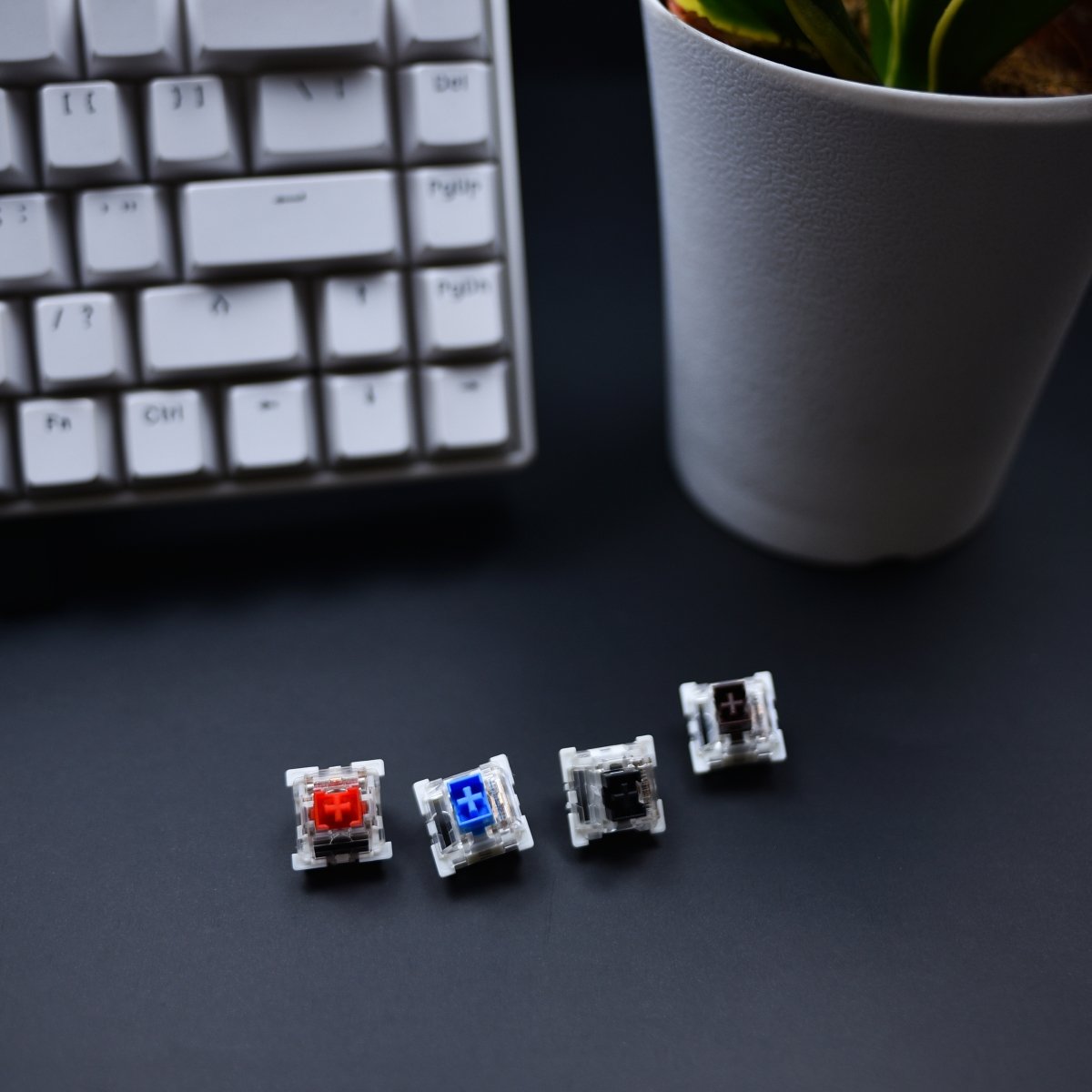
        Mechanical keyboards are a rabbit hole flooded with jargon, which can be overwhelming for beginners to the hobby. Some enthusiasts even mention fruits, such as Cherry! Fret not, today we’re going to find out exactly what "Cherry" is in the context of keyboard enthusiasts. (ps: it's not actually a fruit) What exactly is “Cherry” in mechanical keyboard?   Cherry is a well-known brand in the mechanical keyboard industry. They are a German computer peripheral-device maker. It all started in 1953 when Walter Lorain Cherry founded The CHERRY Corporation in the USA. The CHERRY Corporation was a manufacturer of microswitches which are used in arcade machines. These microswitches can control electrical devices and are used in arcade buttons and joysticks.   In 1967, CHERRY’s production facilities were relocated to Germany. CHERRY started manufacturing computer keyboards in 1973,making them one of the first in the industry. They launched the G80-3000 mechanical keyboard which is now the oldest keyboard series in the world. Its successor, the G80-3000N RGB is still in production today!   In 1983, CHERRY introduced MX mechanical switches which marked the start of mechanical keyboards. Their first ever mechanical key switch was the MX black. Fast forward to 2014, CHERRY introduced the RGB technology. At that time, the mechanical MX keyboards can be illuminated by LEDs with up to 16.8 million colors. The gaming community liked the idea of RGB as it adds to the aesthetics of their setups. Competitors like Razer ventured into the technology as well because of the rising interest in RGB keyboards among the gaming community. As a result, Razer launched their Razer Blackwidow Ultimate 2014 which featured their own green switches.   In 2018, CHERRY launched MX low profile switches which have lower height compared to the normal MX switches. They first introduced MX low profile RED as the red variant was their most popular switch at that time. This allowed for a slimmer keyboard design which complements ergonomic working. Slim keyboards also mean that they are easier to carry around as they dont take up as much space as regular keyboards. The first keyboard featuring these low profile switches was the Corsair K70 RGB MK.2 Low Profile.    The classic Cherry MX switches   Cherry MX Red switches These linear switches are smooth and consistent. Red switches are commonly used in the gaming community because they provide immediate response and require the least resistance to actuate.   Cherry MX Blue switches These switches are clicky and most commonly found in mechanical keyboards. Beginners to mechanical keyboards usually favor these switches as they output the loudest feedback and give the “mechanical” feeling.   Cherry MX Brown switches These are tactile switches. This is the sweet spot between linear and clicky switches.Keyboard enthusiasts love brown switches as they provide a satisfying feeling.   Cherry MX Black switches These switches are similar to red switches. Black switches are linear like red switches but they require higher actuation force compared to reds. This causes the black switches to feel heavier as they require more effort to actuate. Heavier switches allow for precision typing as we are less likely to accidentally press a key.   The modern variants of Cherry MX switches Silver switches One of the fastest Cherry MX switches. They are linear and have low spring resistance. These are upgraded versions of red switches.   Green switches These switches are slightly modified from blue switches. Green switches have an increased actuation force compared to the blue switches.   Gray switches Slightly modified version of brown switches. These switches are tactile just like browns but have a higher actuation force. Gray switches provide a noiseless feedback which results in a silent click, or commonly known as silent switches.   What is the difference between Cherry, Cherry MX & MX style switches?   You may have seen these different terminologies on the internet. Cherry and Cherry MX switches are originals and manufactured by Cherry themself. On the other hand, MX style switches are imitations of Cherry switches. These MX style switches feature the iconic “+” cross-stem of Cherry switches. Why are MX style switches freely distributed in the market? The reason for this is the expiration of Cherry’s patent in 1984. Since then, the market has been flooded with MX style switches which resemble Cherry’s design.    Here is a list of similar brands that manufacture MX style switches: Gateron Outemu Razer Kailh JWK   Modding possibilities for MX style switches    Modding switches is the cheapest way to take your keyboard to the next level. The reason for this is that the tools required to modify switches such as switch lube are usually inexpensive.   DIY lubing To lube your MX style switches, you need to first take apart the switches. Using a switch lube, you can lube many parts of your switches. These include spring, bottom housing, top housing and stem. Lubing switches can change the sound of your keyboard and make it smoother. However, do not overlube your switches as it will make your switches feel mushy and unresponsive.   Damping Damping is to reduce the noise made by your keyboard. One of the methods is to use O-rings. To do that, remove the keycaps on your keyboard and place O-rings in the keycap stem. This will cushion the impact of bottoming out and reduce noise.   All in all, Cherry is a pioneer in the computer hardware industry and has created the world we live in now. Cherry had produced high quality products in the past and always will do. Due to the enormous success of Cherry MX switches, other brands like Gateron and Kailh wanted to compete in the market and reach Cherry’s level. As a result, more MX style switches flooded the market and consumers got a wider range of options to choose from.   Key Takeaways: Cherry is a manufacturer of various computer hardware related products and has over 70 years of history. Cherry MX red, blue and brown switches are linear, clicky and tactile respectively. Cherry MX silver, green and gray switches are their modern counterparts. Cherry manufactures Cherry MX switches whereas other brands produce MX style switches MX style switches provide many modding options to users.

        7 Things to consider when buying a new keycap set

        7 Things to consider when buying a new keycap set

        The Kapco Feb 3, 2023

        When buying a new keycap set, there are several factors to consider to ensure that the keycaps are compatible with your keyboard and will provide a satisfying typing experience. Here are a few things to consider when buying a new keycap set: Compatibility: Make sure that the keycap set is compatible with your keyboard's layout and switch type. This includes the size of the keycaps, the profile of the keycaps and the type of stems the keycaps have. Material: Keycaps are available in a variety of materials, including plastic, rubber, and metal. Each material has its own unique characteristics and benefits. Plastic keycaps are the most common and are available in a wide range of colors and designs. Rubber keycaps are more comfortable to type on and are resistant to wear and tear. Metal keycaps are durable but can be heavy and expensive. Profile: The profile of the keycaps can affect the typing experience. Keycap profiles, such as Cherry, OEM, SA, DSA, XDA, etc are the most common profiles, each of them has a different shape and height, that can affect the typing experience, it's recommended to try different profiles before making a decision. Design: Consider the design and color of the keycaps. Some keycap sets are available in a variety of colors and designs, such as solid colors, patterns, or custom designs. Some keycap sets are designed to match a specific theme, such as a video game or movie. Brand: Look for keycap sets from reputable brands to ensure that they are of high quality and will last a long time. Price: Consider the price of the keycap set and compare it to other sets. Some keycap sets can be expensive, but they may be made of higher-quality materials or have a unique design. Reviews: read reviews from other users, they can provide valuable information about the product's quality, compatibility, and user experience. In summary, when buying a new keycap set, it's important to consider the compatibility, material, profile, design, brand, price and reviews of the keycap set to ensure that you are getting a high-quality product that is compatible with your keyboard and will provide a satisfying typing experience.

        Why different keycaps can make my keyboard sound different?

        Why different keycaps can make my keyboard sound different?

        The Kapco Feb 2, 2023

        Different keycaps can affect the sound of your keyboard in several ways. Here are a few examples: Material: The material of the keycaps can affect the sound of your keyboard. For example, keycaps made of ABS plastic can produce a "pingy" sound, while keycaps made of PBT plastic can produce a "thocky" sound. Additionally, metal keycaps can produce a different sound than plastic keycaps. Profile: The profile of the keycaps can also affect the sound of your keyboard. For example, keycaps with a higher profile can produce a louder sound because they are taller and will bottom out more easily. Dampening O-Rings: Dampening O-Rings are small rubber rings that can be placed on the keycap's stem to reduce the sound of the switch when it bottoms out. They can help to make the keyboard quieter, but they can also change the sound of the keyboard. Stabilizer: The stabilizer is the mechanism that keeps the larger keys (spacebar, enter, etc) stable and aligned, lubing the stabilizer can make them smoother and reduce the sound of the keyboard. Surface: The surface of the keycap can affect the sound of the keyboard, a glossy keycap will produce a different sound than a matte keycap. Switch lubing: lubing the switch can also affect the sound of the keyboard, it can make it smoother and quieter, but it can also change the sound of the keyboard. In summary, different keycaps can affect the sound of your keyboard in several ways, such as material, profile, dampening O-rings, stabilizer, surface, and switch lubing. It's worth noting that the sound of the keyboard is a personal preference, some people like a louder and "pingy" sound, while others prefer a quieter and "thocky" sound. It's recommended to try different keycaps and listen to the sound before making a decision.

        Why you need a deskmat!

        Why you need a deskmat!

        The Kapco Jan 12, 2023

        Deskmat is important, because

        What color of mechanical keyboard switches should I choose (as a beginner)?

        What color of mechanical keyboard switches should I choose (as a beginner)?

        The Kapco Jan 12, 2023

        Brown switches are often recommended for beginners because.....